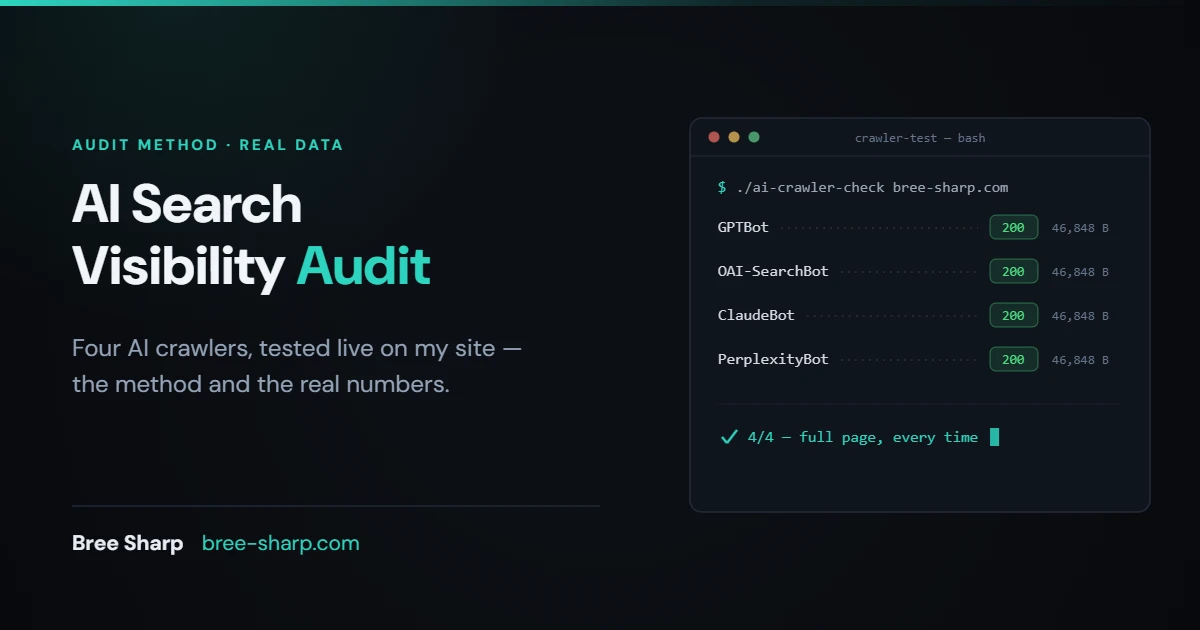
On July 17, I sent a request to my own homepage with the user-agent set to GPTBot. The server answered with HTTP 200 and all 46,848 bytes of the page. Then I ran it again as OAI-SearchBot, ClaudeBot, and PerplexityBot. Four for four, full page every time.
That's the result I wanted. The check sits between SEO tooling and CDN configuration. Google Search Console does not report access for these crawlers, and a standard rank report does not show how the firewall answered them. Server or firewall logs may help if they record the request.
On July 17, 2026, I ran the following audit on bree-sharp.com. You can repeat the same checks on your own site. I kept the real numbers, including the point where the honest answer is "this file probably does nothing."
Step 1: Find out which robots.txt is actually serving
Not the one in your repo. The one a crawler receives. These can be different files.
Cloudflare can prepend managed directives to an existing robots.txt file or create a managed file when an origin does not have one. AI Crawl Control can also enforce crawler-specific access. I run this site on Cloudflare, so I check the live response instead of assuming the repository copy is the whole answer.
Fetch https://yourdomain.com/robots.txt in a browser and compare the response line by line against the file you deployed. My robots.txt checker fetches the live file and tests a URL against the search crawler you select.
On July 17, the live file was fully open.
User-agent: *
Allow: /

Sitemap: https://bree-sharp.com/sitemap.xml
No AI-bot disallows, no managed-file override.
Unexpected disallow lines are a reason to inspect the CDN and bot settings. OpenAI documents GPTBot for foundation-model training controls and OAI-SearchBot for surfacing websites in ChatGPT search. Those controls are independent, so allowing search while declining training is a documented option.
Step 2: Test the firewall layer, not just the polite layer
robots.txt is a request. Your WAF is enforcement. One says what you ask crawlers to do; the other decides what they can do. A crawler can honor your Allow: / and still receive a 403 from a bot-blocking rule.
Send a real request with a spoofed AI user-agent and look at the status code and byte count.
curl -s -o /dev/null -w "%{http_code} %{size_download}\n" \
  -A "Mozilla/5.0 AppleWebKit/537.36 (KHTML, like Gecko); compatible; GPTBot/1.1; +https://openai.com/gptbot" \
  https://yourdomain.com/
Repeat with the user-agent strings for OAI-SearchBot, ClaudeBot, and PerplexityBot.
All four returned 200 with the full 46,848-byte homepage. There was no challenge page or truncated response.
A spoofed user-agent from a residential IP does not perfectly replicate how a WAF treats a verified bot. A rule scoped to verified traffic will not fire on this test. The check still catches a user-agent-level block.
A 403, a 5xx, or a suspiciously small download needs investigation. If a 46KB homepage returns only 2KB, inspect the response before treating it as usable page content.
Step 3: Compare the search coverage you can observe
Providers document different crawlers and controls, but they do not publish a complete map of every source behind every answer. A strong Google result therefore does not guarantee the same coverage in every assistant. I check Brave and Bing as useful search-coverage signals, not as exact replicas of Claude or ChatGPT.
Search your brand name plus your niche on Brave and Bing. Compare which pages appear, whether the descriptions are coherent, and whether an outdated URL is outranking the current one.
On July 17, a Brave search for my name plus my niche returned 10 bree-sharp.com URLs. In a separate check, Claude accurately summarized my positioning, services, and pricing. That combination was encouraging, but it did not prove which source Claude used.
If one engine has thin coverage, start with standard indexability hygiene: crawlable pages, a clean sitemap, no accidental noindex, and clear internal links. My indexability checker covers the public page signals in one pass.
Step 4: Notify participating search engines with IndexNow
IndexNow is a notification protocol for participating search engines. It tells them that a URL changed, but it does not guarantee a crawl, an index update, a ranking, or an AI citation. During my July 17 check, I sent an IndexNow notification and observed a 24 to 72 hour window before the Bing result updated. That is a dated observation, not a promised refresh time for ChatGPT or any other assistant.
Without a notification, discovery depends on normal crawling and internal links. For a time-sensitive page, monitor the participating search engines directly instead of treating one index as a proxy for every AI system.
Step 5: Keep llms.txt cheap and expectations modest
I serve one at /llms.txt. Mine is a short machine-readable summary with entity links: who I am, what I do, canonical URLs for services and tools.
The provider documentation I reviewed below does not describe llms.txt as a production search, training, or citation input. I therefore treat it as an optional summary, not a proven visibility lever.
Mine took twenty minutes and gives me a tidy entity summary. I also like having my canonical links stated in one machine-readable place. That is the entire case. I would not buy a service that promises citations from this file.
Step 6: Publish something worth retrieving
Access and discovery do not guarantee a citation.
- The page answers a specific query with information a reader can verify.
- The important facts are visible in the copy, not trapped in an image or script.
- Accurate structured data gives search engines explicit clues about eligible content, without promising rankings or citations.
- Original measurements and first-hand observations give another writer or system something distinct to reference.
The fundamentals still carry. Make the page accessible, explain the subject clearly, use accurate schema markup when the content qualifies, and publish details worth citing.
What I'm changing, and what I'm not
Changing: visible updated dates when I make a meaningful page change, so readers can judge freshness. I am also publishing more first-hand measurements because I would rather share my own numbers than paraphrase someone else's.
Not changing: robots.txt stays fully open, including for documented training crawlers. That is the access choice I have made for this site. The llms.txt file stays too, with modest expectations. I am not buying an AI-visibility tracking platform right now because sampled model outputs are not the same as complete measurement.
What this audit can't tell you
The method verifies access and observable search presence. It does not verify outcomes.
There is no provider-neutral Search Console for AI answers. I cannot pull a complete report of every query where an assistant cited me last month. Asking assistants directly is sampling, not measurement, and answers can shift between runs. The Brave result in Step 3 is one query on one day.
I also can't fully test verified-bot handling from my desk, as covered in Step 2. None of this shows how a provider weights a signal inside retrieval, and the documentation I reviewed does not publish a complete ranking formula. Treat precise ranking-factor claims skeptically.
The audit establishes whether documented crawlers can reach the page and whether selected search engines show it. If either check fails, fix that access or discovery problem before changing the content.
If you want a review of the standard technical SEO foundations behind crawl and index access, my $500 SEO Health Check includes a written report within 48 hours and a 30-minute walkthrough. The fee can be credited toward eligible build or rescue work booked within 60 days.
FAQ
How do I check if AI can see my website?
Fetch the live robots.txt response and compare it with the file you deployed. Review the official crawler controls for the providers you care about, then send test requests with those user-agent strings and inspect the status and response body. Search coverage on Brave, Bing, and Google can provide additional clues, but it does not reveal an assistant's complete retrieval stack.
Does llms.txt help SEO?
The official provider documentation I reviewed below does not describe llms.txt as a production search, training, or citation input. It can be a low-cost summary of canonical entity links, but I do not treat it as a proven SEO or citation lever.
How do I get cited by ChatGPT?
There is no guaranteed submission path for a citation. OpenAI recommends allowing OAI-SearchBot if you want pages eligible to surface in ChatGPT search. Keep important pages crawlable and indexable. Answer the query clearly and support it with useful internal links. Publish specific information worth referencing. IndexNow can notify participating search engines about a changed URL, but it does not guarantee a ChatGPT citation.
Do AI Overviews use schema markup?
Google does not require special structured data for its AI search features. Accurate structured data can still help Google understand a page and make eligible content available for supported search features. Use it for accurate classification and eligibility, not as a ranking or citation guarantee.
Why does my site show up in ChatGPT but not Claude?
Providers use different crawlers, partners, retrieval systems, and refresh schedules, and they do not publish the complete source path for every answer. Check the documented crawler access for each provider and review the page's public indexability signals. Compare search coverage across engines. Treat the difference as a diagnostic clue, not proof that one named index caused the answer.