Verification is the gate. Until a Google Business Profile is verified it does not appear in the map pack, does not collect reviews that count, and does not do the one job it exists to do. For most businesses it takes a few days and nobody thinks about it again. For a meaningful minority it becomes a loop of rejected documents with no explanation, and there is very little honest writing about what to do at that point.
This guide covers how verification works, which method you get and why, the failure modes, and the escalation path when the in-platform routes run out. I've been doing SEO for eight years across 35+ clients, and I went through a four-week version of this on my own profile — the specifics of that are linked throughout rather than repeated.
What Verification Is and Why Google Requires It
Google Business Profile verification is the process of proving a business is real, is where it says it is, and that you are entitled to manage it. Until it completes, the profile stays in a pending state and does not surface in Google Maps or the local results.
The reason it exists is fraud. Fake listings at rented mailboxes, lead-generation companies creating profiles for businesses they do not own, and competitors claiming each other's listings were all common before verification tightened. The friction you experience as a legitimate business is a side effect of a system built for people acting in bad faith.
That framing matters, because it explains a lot of otherwise baffling behaviour. Google is not evaluating whether you are a good business. It is looking for signals that correlate with fraud, and some perfectly legitimate business structures — particularly solo operators working from home — happen to share signals with the fraud patterns.
The Methods, and Which One You Get
You usually do not choose. Google assigns methods based on category, location, account history and how much it already trusts the business, and the options offered can change between attempts.
| Method | How it works | Typical use |
|---|---|---|
| Postcard | A card with a code is mailed to the address, entered in the dashboard | Long-standing default; still common for physical premises |
| Video | Unedited recording showing location, operations and your authority | Increasingly the default, especially for service-area businesses |
| Phone or text | Code delivered to the business number on record | Offered when the number is well established |
| Code to an address on the business domain | Rare; usually needs a matching domain | |
| Search Console | Instant, via an already-verified domain | Only for some categories, but the fastest when offered |
If you have Search Console verified for the business domain already, always check whether instant verification is available before starting anything slower. It is the one path with no waiting and no failure mode.
Video Verification: What It Actually Asks For
Video is now the path most businesses land on, and it is poorly explained. It wants one continuous recording — no cuts, no pausing, no uploading something filmed earlier — that demonstrates three things in sequence:
- You are at the location on the profile. Usually street, building exterior, and something identifying the address.
- The business operates there. Signage, branded equipment, stock, tools, vehicles.
- You have authority over it. Access to areas the public cannot reach, business paperwork, a point of sale, keys.
Requirement two is where home-based and service-area businesses fail. A consultant working from a spare room has no signage and no customer-facing premises, so there is nothing to film that satisfies it. This is not a case of doing the video badly. The evidence the system asks for does not exist for that business type, and repeating the recording more carefully does not change that.
Why Verifications Fail
Rejections almost never say which problem triggered them. The recurring causes, roughly in order:
- Name, address and phone inconsistency between the profile, your website and existing directory listings. Old suite numbers and retired tracking numbers are the usual culprits. Worth checking with a NAP consistency checker before you start.
- A category implying premises you do not have. Storefront categories on a service-area business invite scrutiny.
- Documentation that does not carry the exact profile name. A utility bill in a personal name, or a registration under a slightly different trading name, reads as a mismatch.
- Service-area business at a residential address. The single most common hard case, covered below.
- Editing the profile mid-verification. Changing name, address or category while a check is pending restarts or muddies it.
The Home-Based and Service-Area Problem
This is the case worth spending words on, because it is where the standard flow genuinely has no clean answer.
If you run a service-area business from home — consulting, trades, mobile services — the correct configuration is a service-area business with the address hidden. That is the honest setup and the one Google documents. It is also the configuration most likely to stall, because Google has a documented tension with profiles combining service-area status, consulting-type categories and a home address.
The documents Google requests compound it. Business registration, business license, a utility bill carrying the business name: all of these assume a registered entity or a state licensing framework. A sole operator in a state that neither requires nor issues a license for their work does not map onto that assumption, and no amount of resubmitting produces a document that does not exist.
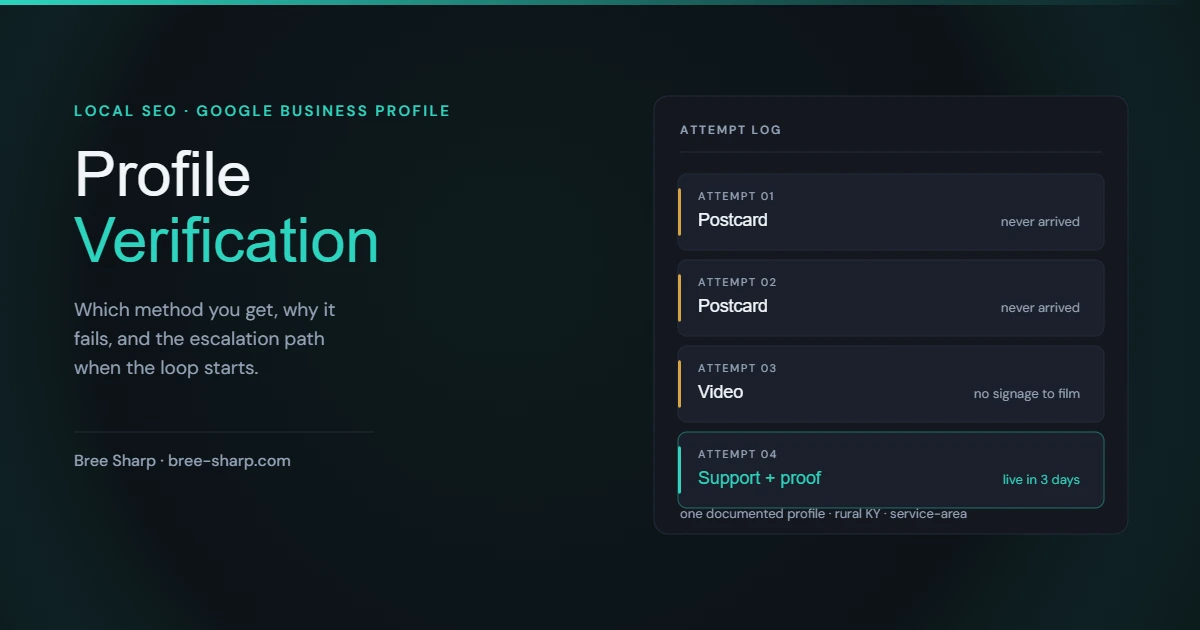
Home-based SEO consulting practice in rural Kentucky, configured as a service-area business. Two postcards requested; neither arrived. Video verification attempted and failed — no signage to film. Roughly four weeks pending with no path forward.
The mistake worth learning from: after the first postcard failed, I added my physical address to the profile hoping it would unlock a different route. It did not. It muddied the profile type at the worst moment. Do not add an address to a service-area profile while verification is pending.
What eventually worked was leaving the in-platform flow entirely, reaching support, naming the documentation loop explicitly rather than resubmitting silently, and supplying proof of existence — 14 URLs showing the business active, Chamber-listed and working with clients. The profile went live three days after that email. I cannot prove causation, but it did not hurt.
What to Do When Verification Stalls
- Fix your NAP consistency first. If the profile disagrees with your website or your existing listings, resolve that before another attempt. You are otherwise re-submitting into the same rejection.
- Do not edit the profile while a check is pending. Especially not the address, name or category.
- After two failed attempts, stop repeating the method. Two failed postcards is information, not bad luck. A third will not behave differently.
- Get into support. Go to the Business Profile help section and look for Contact Us; depending on account status you may get email, chat or a callback. Support agents can escalate in ways the automated flow cannot.
- Name the loop explicitly. "I have submitted this document twice and received the same request with no explanation of why it was rejected" is a materially different message from silently re-attaching the file. Agents need a stated reason to escalate.
- Supply proof of existence even though it is not a formal path. Chamber listings, client-facing pages, directory profiles, press. It is not the documentation they asked for, and it may still help.
Verification Is Not Suspension
These get conflated constantly and they need opposite responses.
Verification is the gate before a profile goes live. Suspension is Google removing or restricting a profile that was already verified — usually triggered by an edit, a category change, or a quality review.
If your profile was live and then vanished, do not start a new verification. That is a suspension, and the route back is an appeal with evidence. The mechanics are different enough to need their own guide: what to do when your Google Business Profile is suspended.
How Long It Should Take
Video and phone verification often resolve within a few days. Postcards are quoted at up to 14 days and regularly take longer or never arrive, particularly at rural addresses. Search Console verification, where offered, is instant.
Past three weeks with nothing, treat the process as stalled rather than slow. Waiting longer is not a strategy, and the escalation path above is what changes the outcome.
Stuck in the loop?
Free initial assessment for suspended or stalled profiles — evidence-backed appeal help, a clear quote before any work starts, and no false guarantees.
FAQ: Google Business Profile Verification
How long does Google Business Profile verification take?
Video and phone verification are often resolved within a few days. Postcard verification is quoted at up to 14 days and frequently takes longer or never arrives at all, particularly at rural addresses. If you are past three weeks with no result, the process has stalled rather than being slow, and the fix is to change method or reach support rather than to keep waiting.
Why does Google keep rejecting my verification?
The most common causes are a mismatch between your business name, address and phone across your website and listings; a category that implies a storefront when you do not have one; documentation that does not carry the exact business name on the profile; and service-area businesses run from a home address, which Google treats with particular suspicion. Rejections rarely explain which of these triggered them, which is why the loop is so frustrating.
What does Google video verification actually ask for?
A single unbroken recording showing three things: evidence you are at the business location, evidence the business operates there such as signage, equipment or stock, and evidence you have management authority such as access to a till, a back office or business paperwork. The recording cannot be edited and cannot be paused. For a business with no signage and no customer-facing premises, this path has real limits, because there is little to film that satisfies the second requirement.
Can a home-based business get verified on Google?
Yes, but the standard flow is not designed for it. Google's requested documents — business registration, business license, a utility bill carrying the business name — assume a registered or licensed entity, which many sole operators in many states simply do not have. The route that tends to work is to configure the profile as a service-area business, hide the address, and if the in-platform methods fail twice, go to support and make an explicit argument for why your documentation is sufficient given your actual business structure.
Is verification the same as being suspended?
No, and they need different responses. Verification is the process of proving a business exists before the profile goes live. Suspension is Google removing or restricting a profile that was already verified, usually after an edit, a category change, or a quality review. If your profile was live and then disappeared, that is a suspension and the path back is an appeal with evidence, not another verification attempt.